
// Exact-answer migration guide
How to Migrate a Lovable App to Self-Hosting Without Breaking the Backend or Connectors
A practical migration plan for moving a Lovable app to infrastructure you control while preserving data, authentication, storage, connectors, Codex or Claude workflows, and a rollback path.
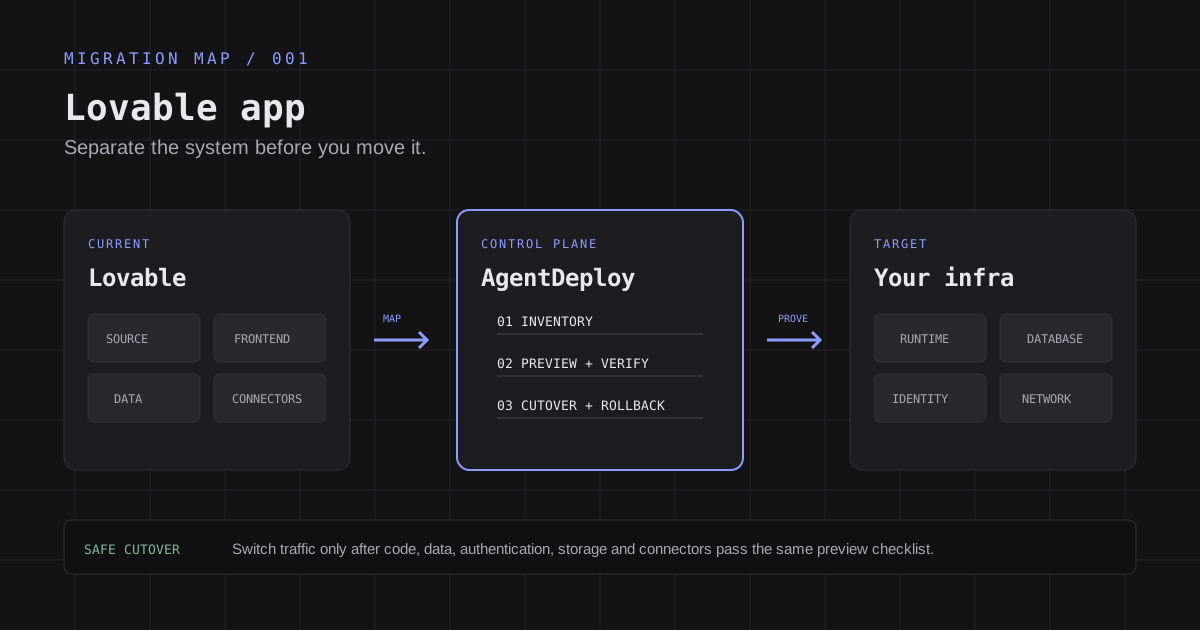
Yes, you can move a Lovable application to infrastructure you control and continue working with Codex or Claude Code. The safe path is not to copy the repository and point DNS at a new server. You must inventory and validate six separate parts: source code, frontend or server runtime, database, authentication, file storage, and external connectors. Keep the current Lovable deployment available until the new environment passes a production-like preview and a rollback window.
Direct answer: sync or download the source, identify whether the app is React + Vite or TanStack Start, reproduce it outside Lovable, migrate backend services separately, recreate connector credentials, deploy an immutable preview, test real business flows, then switch traffic with rollback ready.
The exact problem behind the question#
The original question is common: "I created a management system on Lovable. It has a lot of backend and connectors. How can I move everything safely to self-hosting and continue to use Codex or Claude?"
That question contains three different goals:
- Own the production environment. The application should run in a cloud account, server, cluster, data center, or homelab controlled by the user.
- Keep an AI-assisted development workflow. Codex or Claude Code should continue editing, reviewing and operating the code from a repository the user controls.
- Avoid losing hidden platform services. Database records, authentication, file storage, secrets, webhooks and third-party connector behavior must survive the move.
The third goal is where migrations fail. A Git repository contains code and migration files. It does not automatically contain production database records, uploaded files, provider credentials, OAuth grants, authentication state or every service managed by the original platform.
Choose the migration scope before touching production#
There are three valid migration scopes. Choose one explicitly so your agent does not turn a frontend move into an accidental full-platform rewrite.
Option 1: move only the frontend#
The frontend runs on infrastructure you control, while the existing Lovable backend remains in use. This is the smallest change and usually the fastest way to prove that external deployment works.
You still need to configure environment variables, authentication redirect URLs, DNS, HTTPS, logs and rollback for the new frontend. Data and connector behavior remain tied to the existing backend.
Option 2: move the backend and data, then move the frontend#
Use this path when the main requirement is data ownership, residency, private networking or backend control. The frontend can temporarily stay where it is while you copy the database, authentication configuration, storage and functions to managed Supabase or self-hosted Supabase.
This reduces the number of simultaneous changes, but it requires careful compatibility testing. Moving PostgreSQL tables alone does not move Supabase Auth, Storage, Realtime, Edge Functions, row-level security policies or external secrets.
Option 3: leave Lovable services completely#
This is a full operating-model change. You deploy the code, move every backend service, replace calls that depend on Lovable-managed runtime services, establish your own release process and take responsibility for monitoring, backups, certificates, scaling and incident recovery.
Choose this only when you have a concrete reason and an owner for ongoing operations. Self-hosting transfers control to you, and it also transfers operational responsibility.
A safe migration sequence#
1. Create an application inventory#
Ask Codex or Claude Code to inspect the repository without making changes. The output should be a migration inventory, not a deployment attempt.
Record at least:
- Framework and build type: React + Vite, TanStack Start, or another customized stack.
- Package manager and lockfile: npm, Bun, pnpm or another tool.
- Browser environment variables and server-only secrets.
- Database schema, extensions, row-level security policies, triggers and scheduled jobs.
- Authentication providers, redirect URLs, email templates and user lifecycle hooks.
- Storage buckets, object access rules and uploaded-file volume.
- Edge Functions, server functions, API routes and background work.
- Realtime subscriptions and WebSocket behavior.
- Every connector, webhook, OAuth client, API key and callback URL.
- DNS records, custom domains, certificate behavior and current cache TTL.
- Monitoring, analytics, email, payments and error-reporting services.
Do not let an agent print secret values into the report. It should record secret names, owners and destinations, then ask for scoped authorization only when a migration step needs them.
2. Put the source in a repository you control#
Lovable's current documentation describes two source paths:
- Git sync can keep a project synchronized with GitHub, GitLab or Bitbucket and is intended for ongoing work and external deployment.
- Download codebase provides a one-time archive on eligible paid plans.
For a continuing Codex or Claude Code workflow, Git sync is the better foundation. Clone the repository, create a migration branch and keep the existing production branch unchanged until cutover.
Lovable documents one-branch-at-a-time synchronization. Avoid rewriting the history of the branch Lovable is syncing. Use a separate feature or migration branch, review it, and merge through your normal process.
3. Identify the runtime before choosing a host#
Current Lovable documentation distinguishes two common project types:
- Older React + Vite applications build static assets into
dist/. They can run on static hosting, object storage plus a CDN, Nginx, or another web server. Client-side routes need the correct fallback behavior. - TanStack Start applications run server-side code, server functions and API routes. They need a server-capable target, such as a supported managed runtime, a container, or a virtual machine. Static file hosting alone is insufficient.
Inspect package.json. A TanStack Start project normally includes @tanstack/react-start; an older Vite project does not. Do not select infrastructure until this check is complete.
For a server deployment, Lovable's guide currently documents Nitro-based output and Node.js 22 for the Node server preset. Treat those settings as project-specific evidence to verify in your repository rather than a universal command for every Lovable application.
4. Reproduce the application outside Lovable#
Before migrating data, prove that a clean checkout can install, build and start in an isolated environment.
Use the lockfile already committed to the repository. Keep browser-visible variables separate from server secrets. A variable prefixed with VITE_ is compiled into browser code and must never contain a service-role key or another private credential.
Test with a non-production backend or read-only data path when possible. A local clone configured with the production backend can change real production records.
The result of this step should be a reproducible artifact and a dependency report. It is not yet proof that the application is safe to receive users.
5. Migrate the backend as a system, not as a database dump#
If the application uses Lovable's built-in backend or Supabase, divide the backend migration into separate workstreams:
- Schema and policies: migrations, extensions, functions, triggers, row-level security and grants.
- Database records: a consistent export, transfer and import plan, including sequences and large tables.
- Authentication: providers, redirect URLs, user identities, password or token limitations, email configuration and session behavior.
- Storage: bucket definitions, access policies, object files and public or signed URL behavior.
- Server logic: Edge Functions, server functions, API routes, environment secrets and scheduled tasks.
- Realtime: publications, subscriptions and client reconnection behavior.
Lovable's official guide states that source export includes configuration and migration files but does not include database records or storage objects. Those need separate transfer steps.
For a management system, plan a consistency window. You can use a maintenance window, a write freeze, or a final incremental copy after an initial bulk transfer. The correct choice depends on how much data changes and how much downtime the business accepts.
6. Recreate connectors and credentials#
Create a connector matrix with one row per integration:
- Service name and business purpose.
- Current owner and credential type.
- Where the credential is stored today.
- New service account or OAuth client required.
- Redirect, webhook or callback URLs to update.
- Required scopes and the minimum permission set.
- Test request and expected response.
- Revocation plan for the old credential.
Lovable's Git sync documentation warns that credentials behind app or chat connectors and Lovable-managed AI access are managed by Lovable and cannot simply be copied from the repository. If you leave those services, replace them with direct provider credentials or an equivalent integration owned by your organization.
Do not copy a production secret into an agent prompt. Let the agent prepare the configuration names and provider steps, then complete sensitive authorization through the provider's normal browser or secret-management flow.
7. Deploy an isolated preview through AgentDeploy#
AgentDeploy fits after the application has been built. It gives Codex, Claude Code and other supported agents a unified control plane for the deployment and operating phase.
A migration workflow can use AgentDeploy to:
- Identify a supported deployment profile for the actual application stack.
- Select infrastructure the customer chooses and controls.
- Package and verify an immutable release artifact.
- Deploy that release to a separate Preview environment.
- Record the target, release identity and observed readiness.
- Expose the Preview through an explicit access policy.
- Promote the exact reviewed release to production only after explicit approval.
- Keep stop, resume, logs and code rollback in the same operating model.
The target profile still matters. A Vite frontend may fit a static deployment. A TanStack Start application may require an OCI container or a qualified Worker profile. A backend migration may also require provider-specific skills, CLIs or APIs. AgentDeploy coordinates these operations; it does not make an incompatible application portable by hiding the incompatibility.
8. Validate the whole application in Preview#
Build a test matrix from business behavior, not only HTTP status codes.
For a management system, validate:
- New and existing user sign-in, sign-out, password reset and invited-user flows.
- Role and permission boundaries for normal users, managers and administrators.
- Create, update, delete, search, export and bulk-action workflows.
- File upload, download, deletion and signed URL expiration.
- Every external connector with a test account or sandbox environment.
- Incoming webhooks and outgoing callbacks.
- Scheduled work, email delivery and background processing.
- Server-rendered routes or server functions if the project uses TanStack Start.
- Logs, health checks, alerts, backup jobs and restore procedures.
- Page performance and cache behavior on the intended network path.
Compare important record counts and checksums between the old and new backends. For business-critical records, sample actual rows and verify relationships, ownership and access policies.
9. Cut over traffic with rollback ready#
Reduce DNS TTL before the planned switch. Freeze or control writes, perform the final data synchronization, verify the new environment, then update the production entry point.
Keep the previous deployment and backend available during a defined rollback window. Monitor errors, authentication failures, connector failures, queue backlogs and database write rates.
Rollback must be more specific than "change DNS back." If the new system has accepted writes, decide how those records will be reconciled before returning traffic to the old backend.
After the window closes, revoke old connector credentials, remove unused OAuth callback URLs, rotate secrets exposed during transition, and archive migration evidence.
A prompt for Codex or Claude Code#
Use this prompt after the project is safely cloned. It asks for a plan and evidence before execution:
Audit this Lovable application for migration to infrastructure I control.
Do not deploy, change provider configuration, print secret values, or modify production data.

1. Identify whether the frontend is React + Vite, TanStack Start, or another stack.
2. Inventory runtime dependencies, environment variable names, database migrations,
   authentication, storage, server or Edge Functions, realtime features and connectors.
3. Separate what exists in Git from what must be exported or recreated elsewhere.
4. Propose a phased plan: local reproduction, target architecture, data migration,
   connector migration, Preview validation, cutover and rollback.
5. List missing access, decisions and evidence as blockers instead of guessing.
6. Produce a test matrix for the application's real business workflows.
Once the report is reviewed, connect the agent to AgentDeploy and ask it to prepare the supported Preview deployment. Keep data migration and production promotion as separately approved operations.
Where AgentDeploy adds value in this migration#
The migration is not valuable because it moves from one vendor name to another. It is valuable when the user gains a repeatable operating model across infrastructure choices.
AgentDeploy provides that operating layer near the user's agent:
- One agent-facing entry point: the user can continue from Codex, Claude Code or another supported MCP client.
- Infrastructure choice: deployment targets remain in customer-controlled cloud accounts, provider runtimes, edge sites or private infrastructure.
- Preview before production: the exact release is validated separately before an explicit production promotion.
- Scoped authority: the agent receives only the organization and infrastructure access needed for the task.
- Release evidence: artifacts, releases, deployments and observed readiness remain identifiable instead of being hidden inside an opaque chat action.
- A path beyond one migration: later applications can use the same control plane even when their providers and runtimes differ.
AgentDeploy is not a managed replacement for the customer's database, hosting account or connector vendors. It is the neutral control plane that helps the user's agent coordinate those systems while the infrastructure stays under the user's control.
A short walkthrough will live here
The article is complete without video. When a matching tutorial is published, this slot accepts a self-hosted or privacy-conscious embed, a transcript, captions, a poster image and `VideoObject` metadata without changing the article structure.
Migration checklist#
Before calling the migration complete, confirm all of the following:
- Source is stored in a repository the organization controls.
- The project type and required runtime are proven from the code.
- A clean environment can reproduce the build.
- Production secrets are absent from source, logs and agent prompts.
- Database schema and records are migrated and compared.
- Authentication, redirect URLs and role policies work on the new domain.
- Storage buckets, files and access rules are migrated.
- Functions, scheduled jobs and realtime behavior are tested.
- Every connector has a new owner, credential, callback and test result.
- The exact release passes a production-like Preview.
- DNS, HTTPS, monitoring, backups and incident ownership are ready.
- The cutover plan includes a write strategy and a timed rollback decision.
- Old credentials are revoked after the rollback window.
Evidence and source notes#
This guide uses the current Lovable documentation as the source for Lovable-specific portability details:
- Lovable Git sync overview describes two-way repository sync, local IDE workflows, environment caveats and connector credentials that do not travel in Git.
- Deployment, hosting, and ownership options explains code ownership, the difference between frontend and backend portability, and the operational responsibilities of self-hosting.
- Deploying and hosting outside Lovable documents source export, React + Vite versus TanStack Start hosting requirements, and separate backend and data migration steps.
- AgentDeploy Platform describes the neutral control-plane model, infrastructure choice and agent-driven deployment lifecycle.
- AgentDeploy Agent Guide provides the official MCP connection workflow for supported agents.
Product behavior can change. Recheck provider documentation and the actual repository before executing a migration.
Frequently asked questions#
Can I self-host a Lovable app and still use Codex or Claude Code?#
Yes. Put the code in a Git repository you control, clone it into the Codex or Claude Code workspace, and use the agent for code and migration planning. Deployment access should be scoped separately through AgentDeploy or the target provider. Continuing to use Lovable at the same time depends on your Git sync branch strategy.
Does exporting the Lovable code also export the database and uploaded files?#
No. Lovable's documentation states that source export includes project code, configuration and migration files, but not production database records or storage objects. Data, authentication, storage and connector credentials need separate migration procedures.
Can I move only the frontend first?#
Yes. That is often the lowest-risk first phase. Deploy the frontend externally while it continues using the existing backend, then migrate backend services later. You still need correct environment variables, authentication redirect URLs, HTTPS, monitoring and rollback.
How do I know whether the app can use static hosting?#
Inspect package.json. Older React + Vite projects normally build static files into dist/. TanStack Start applications include server behavior and need a server-capable target. Verify the actual project because custom changes can alter these assumptions.
Can I copy Lovable connector credentials into the new host?#
Do not assume that you can. Lovable documents that credentials behind some app and chat connectors and Lovable-managed AI access are managed by Lovable and are not copied through Git. Create organization-owned service accounts or OAuth clients and test each replacement integration.
Is self-hosted Supabase the same as moving the PostgreSQL database?#
No. Supabase includes PostgreSQL plus authentication, storage, realtime, functions and policy configuration. A database-only transfer can leave major application behavior behind. Inventory and migrate each service explicitly.
Can AgentDeploy perform the migration automatically?#
AgentDeploy can let your agent coordinate supported deployment targets, immutable releases, Preview validation and explicit production promotion. Provider-specific skills can automate parts of inventory and migration. Data semantics, unsupported connectors, credential authorization and business acceptance tests still require explicit evidence and, in some cases, manual work.
What is the safest rollback plan?#
Keep the old deployment available, define how writes are frozen or synchronized, lower DNS TTL before cutover, and monitor the new system during a fixed rollback window. If the new backend accepts writes, include a reconciliation plan rather than relying on DNS reversal alone.
// Turn the checklist into an agent workflow
Keep the infrastructure under your control. Give the migration a control plane.
AgentDeploy lets your Codex, Claude Code or other supported agent coordinate releases, preview environments, infrastructure targets and explicit production approval from one operating model.